
Download Whenever – Sticky Notes, Countdown, Reminder
Overview
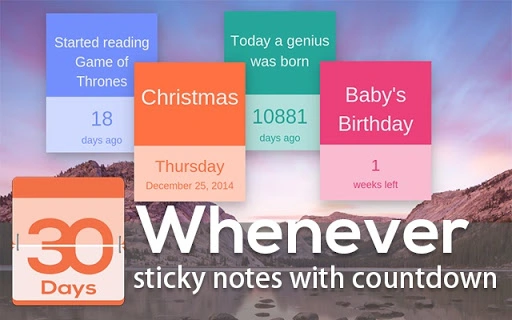
Whenever is a lightweight desktop application designed to help users manage time-sensitive tasks through customizable sticky notes with built-in countdowns. The software enables users to create visual reminders that track time down to specific dates, making it ideal for personal and professional planning. With adaptive font sizing and multiple date display formats, the tool ensures readability across different screen sizes and user preferences.
It is particularly useful for individuals who rely on visual cues to stay on schedule, such as students managing deadlines, remote workers tracking project milestones, or anyone seeking a simple way to visualize upcoming events. The application runs directly on Windows and Mac systems, offering a seamless experience without requiring cloud synchronization. The developer did not provide additional background information, but the app’s evolution from version 0.1 to 0.6 indicates ongoing refinement focused on usability and functionality.
Real-world use cases include tracking exam dates, remembering birthdays, setting task deadlines, or monitoring event countdowns—all within a minimal, unobtrusive interface.
Key Features & Capabilities
- Adaptive Font Sizing – The text size automatically adjusts based on the amount of content, ensuring optimal legibility without manual resizing.
- Customizable Date Countdowns – Users can set and display countdowns to specific dates, with support for multiple date format options.
- Draggable and Fixable Windows – Notes can be moved freely across the screen, and users can now lock their position to prevent accidental movement.
- Hover Effects and Visual Feedback – A subtle hover circle effect enhances interactivity, improving the user experience during navigation.
- Internationalization Support (i18n) – The integration of moment.js allows for localized date and time display, supporting diverse regional preferences.
- Minimalist Design – The interface remains clean and distraction-free, focusing solely on functionality and clarity.
These features allow users to create persistent, visually intuitive reminders that stay visible on their desktop. For example, a student might use the app to track final exam dates, while a project manager could set countdowns for deliverables. The ability to fix window positions ensures that critical notes remain visible even after system restarts. The use of moment.js also enables accurate handling of time zones and calendar systems, making it suitable for global users. While no advanced automation or integration with calendars is mentioned, the app excels in providing a simple, focused tool for time-based reminders.
User Interface, Workflow & Performance
Whenever features a clean, minimalist user interface that prioritizes clarity and ease of use. The main window appears as a small, draggable note with a transparent background, allowing users to place it anywhere on the screen without obstructing other applications. Navigation is intuitive: clicking the note brings up options for editing the content and date, while hovering triggers a subtle visual effect.
The workflow is straightforward—create a note, enter text, set a date, and the countdown begins automatically. The developer did not specify resource usage details, but given the app’s small size of 2.5 MB and its lightweight nature, it is expected to consume minimal CPU and RAM. Performance observations are based on general software behavior patterns.
Stability appears to have improved with recent updates, particularly with the fix for the minimize bug in version 0.3 and the enhanced window management in version 0.6. The application runs smoothly on both Windows and Mac platforms, with no reported crashes or freezes in the provided update history. Overall, the interface supports efficient task management without complexity or delay.
Compatibility & System Requirements
Whenever is compatible with both Windows and Mac operating systems, making it accessible to a broad range of users. The software has a compact installation size of 2.5 MB, indicating minimal disk space usage. The developer did not provide additional system requirements, so exact hardware specifications such as RAM, processor, or GPU details are not available.
Compatibility information was partially provided, with no mention of specific OS versions or architecture (e.g., 32-bit vs 64-bit). The application is designed as a desktop utility, suggesting it operates independently of internet connectivity. Users should ensure their system meets standard requirements for running lightweight desktop applications.
The developer did not specify whether the app supports touchscreens or high-DPI displays, but its adaptive font sizing suggests some level of responsiveness to display settings.
Pros and Cons
Pros
- Lightweight at only 2.5 MB
- Adaptive font sizing improves readability
- Multiple date formats and i18n support for global users
- Draggable and fixable note windows for better placement control
- Free to download and use
- Simple, distraction-free interface
Cons
- No cloud sync or cross-device access
- Exact system requirements not specified
- Limited customization beyond text and date
- No integration with calendar or task management tools
- Updates are infrequent, with no public release schedule
FAQ Section
Is Whenever available for both Windows and Mac?
Yes, Whenever is compatible with both Windows and Mac operating systems.
Can I use Whenever offline?
Yes, the application does not require an internet connection to function, making it suitable for offline use.
Does Whenever support different languages?
Yes, the app includes i18n support through moment.js, allowing for localized date and time display.
Is the software free to download?
Yes, Whenever is available at no cost.
How often are updates released?
Updates have been released irregularly, with the latest version being 0.6 as of May 12, 2024. The developer has not announced a fixed update schedule.
Final Thoughts + CTA
Whenever delivers a focused, no-frills solution for users seeking visual time-based reminders. Its minimalist design, adaptive text, and customizable countdowns make it ideal for anyone who benefits from seeing deadlines and events directly on their desktop. While it lacks advanced features like cloud sync or calendar integration, its simplicity is its strength.
The ability to fix window positions and use multiple date formats enhances usability across different workflows. For students, professionals, and casual users alike, Whenever offers a reliable, secure, and efficient way to stay on track. With a small footprint and a free license, it’s a smart choice for those who value productivity without complexity.
Download Whenever now to bring your deadlines into clear view.







